


GreenPT Meetings
Your notes, filled in. You stay in the call.
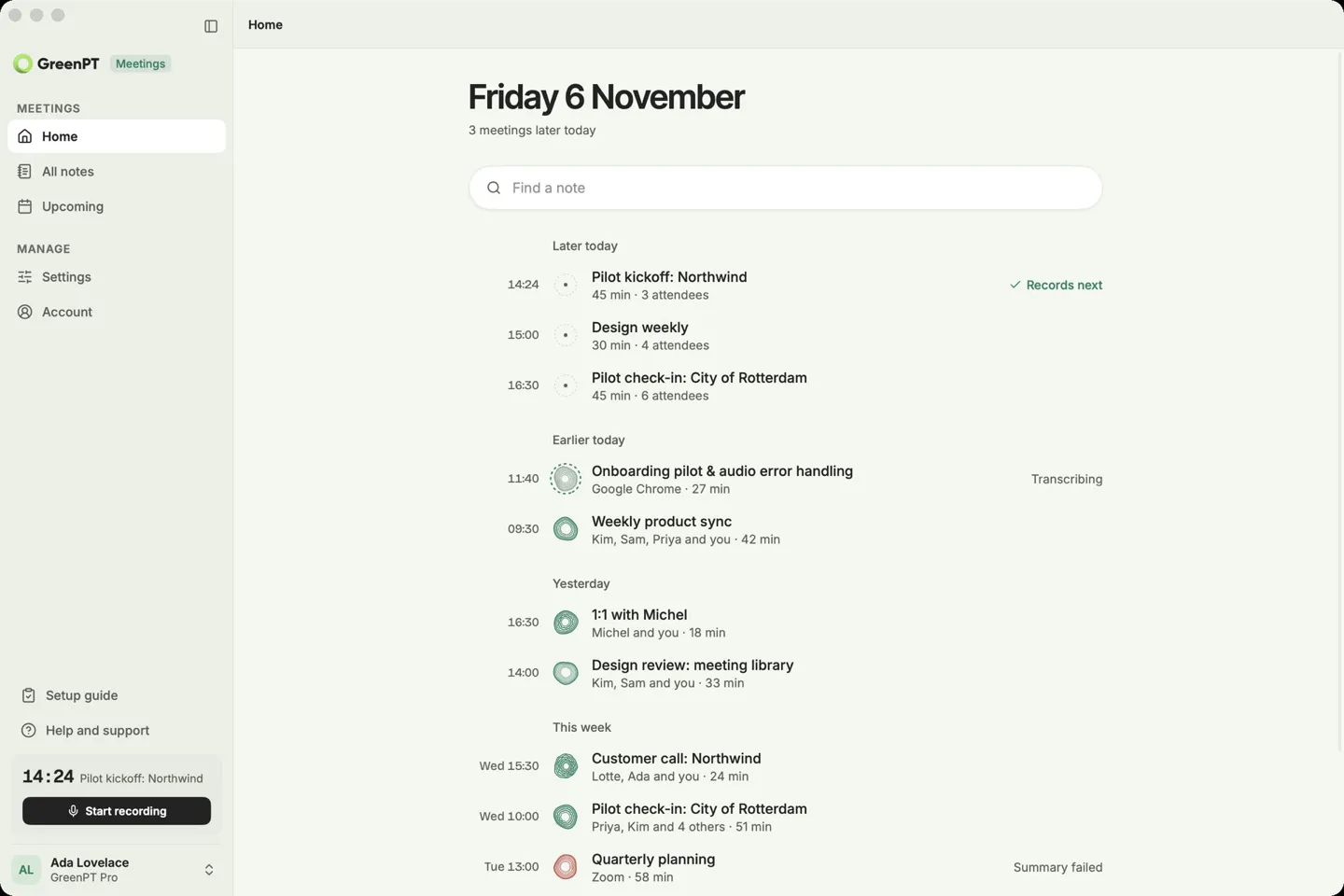
GreenPT Meetings records your calls from your own computer, keeps what you wrote word for word, and fills in the rest from the transcript when you stop.
- Mac: available now
- Web: available now
- Windows: coming soon
- Your words kept as written
- Audio deleted once transcribed
- Records without a connection
- Notices when a call starts
How it works
Before, during and after every call.
GreenPT Meetings follows a call from start to finish. It prepares you, stays out of the way while you talk, and turns what was said into notes you can use.
Before the call
Walk in knowing what is still open.
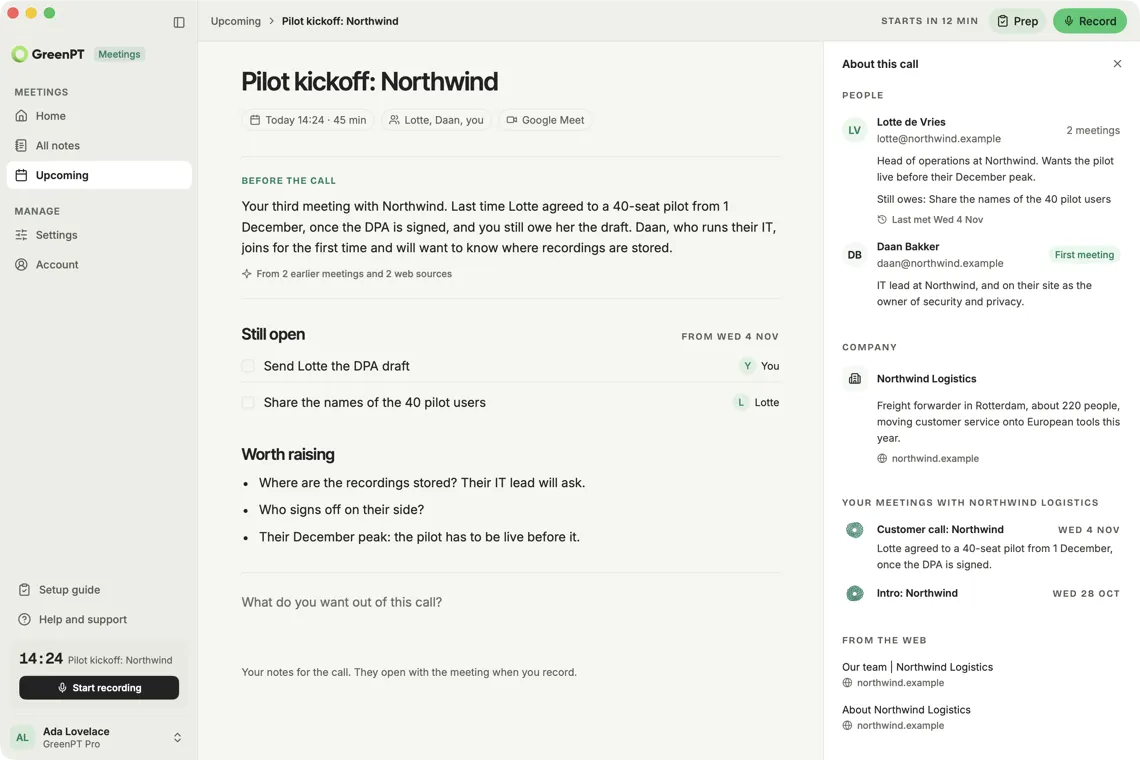
Before each meeting in your calendar, GreenPT Meetings reads your earlier meetings with the same people and pulls together what you need: who is coming, what you promised last time, and what is still open.
- Who is coming, and what they do
- What you still owe them, and what they owe you
- Open questions from earlier calls, and their company’s website
During the call
Write what matters. Nobody joins.
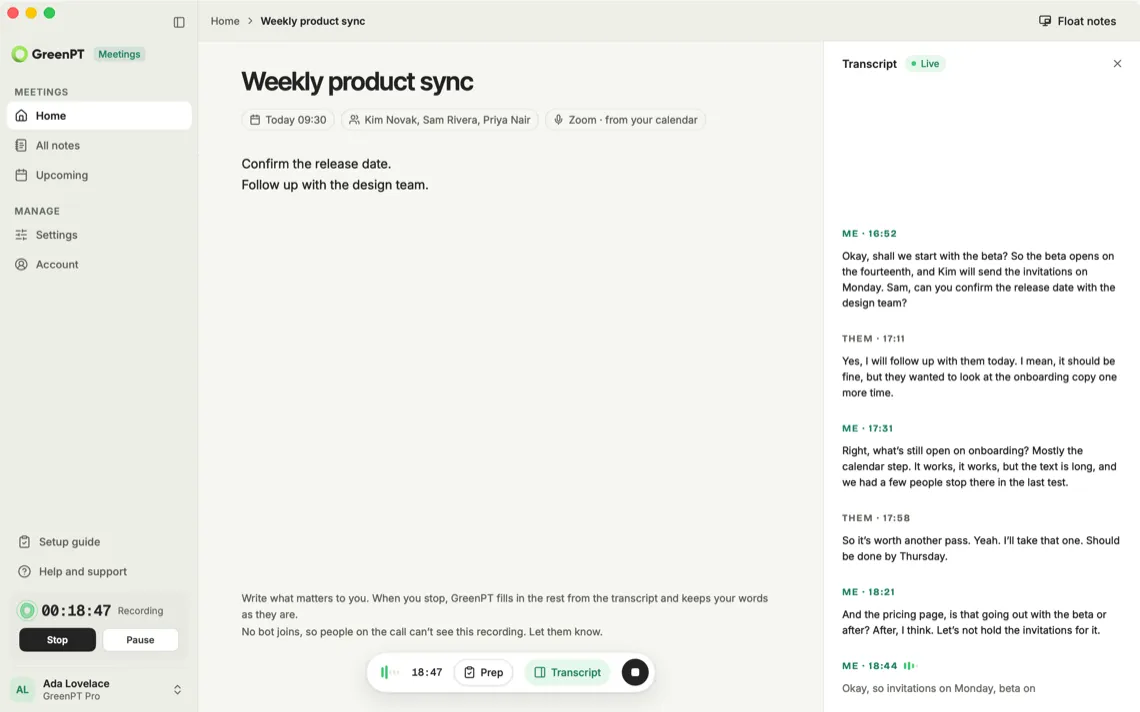
Press record, or let it start when a call does. The audio is captured on your own computer, so no bot appears in the call. Type a few lines of your own while the transcript runs beside them.
- Records both sides, from your microphone and speakers
- A live transcript, split into you and them
- Floating notes stay on top of the call
After the call
Your notes, filled in.
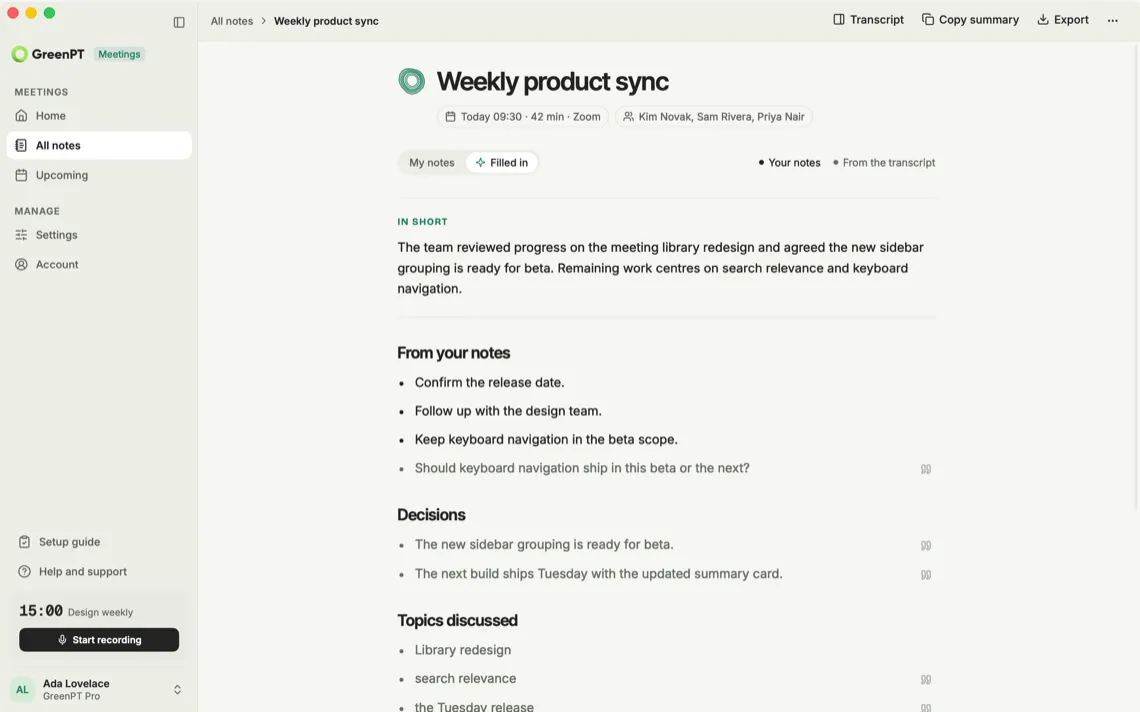
When you stop, GreenPT fills in the rest from the transcript and keeps your words as they are. Your own lines stay dark; everything the transcript added is lighter, with a quote mark that takes you to the moment it was said.
- A short summary, decisions and topics
- Every added line links back to the transcript
- Copy the summary or export the notes
Shown: the Mac app.
Built for real calls
Quietly reliable, call after call.
Notices when a call starts
On a Mac, Zoom, Teams, Slack, FaceTime, WhatsApp, Webex, Discord and every mainstream browser are recognised, plus any app you add yourself.
Survives a crash
The recording is written as it goes. If the app or your computer stops, the audio so far is still there and is picked up on the next launch.
Records without a connection
On a Mac, recording and notes never wait on the network. The recording is uploaded when you are back online, and the transcript and summary follow.
Notes that float
A small notepad sits above the call. What you type is saved on your computer first.
Every meeting, findable
Notes, summaries and transcripts live in one library. Search across all of them from the home screen.
Share what was decided
Copy the summary into a chat or an email, or export the notes and the transcript.
Where it runs
On your Mac and in your browser.
Sign in with your GreenPT account on both.
- Available now
Mac
A native app in your menu bar. Notices calls, records both sides, prepares you before each call and keeps a floating notepad on top. macOS 14.4 or later, Apple silicon and Intel.
- Available now
Web
Record in your browser, including the other side of an online call, or upload a recording you already have. Live notes, a transcript and a summary, with nothing to install.
- Coming soon
Windows
A native Windows app is on its way. Until then, the web app works in any browser on Windows.
Privacy first
Your conversations stay yours.
A meeting recorder hears things people would not write down. GreenPT Meetings is built around that.
Recorded on your own computer
Audio is captured on your computer, not by a participant that joins the call. Nothing about the meeting changes for anyone else.
Nothing leaves until you stop
On a Mac, the recording stays on your computer while the call runs. It is uploaded for transcription only when you stop.
Audio deleted once transcribed
Audio is uploaded only to make the transcript, and deleted from GreenPT’s servers as soon as the transcript is ready. On a Mac, the local copy goes too, unless you choose to keep it.
Tell people you are recording
Because no bot joins, the others on the call cannot see the recording. The app reminds you to let them know.

GreenPT Meetings
Try it on your next call.
Sign in with your GreenPT account, record one meeting, and see your notes filled in.
Windows is coming soon.
Questions, answered
Does a bot join my call?
No. GreenPT Meetings records from your own computer, so nobody new appears in the call. Because the others cannot see it, let them know you are recording.
What happens to the audio?
On a Mac, the recording stays on your computer while the call runs and is uploaded only when you stop, to make the transcript. GreenPT deletes the audio from its servers as soon as the transcript is ready, and the Mac app deletes its own copy too, unless you turn on Keep the audio file.
Which apps does it notice?
On a Mac, GreenPT Meetings notices when Zoom, Teams, Slack, FaceTime, WhatsApp, Webex, Discord or any mainstream browser starts using the microphone, and you can add other apps yourself. In the browser, you start the recording yourself.
Do I need the Mac app, or is the web enough?
The web app records in your browser, including the other side of an online call, and you can upload a recording you already have. The Mac app adds what a browser cannot do: it notices calls, records both sides from any app, keeps recording without a connection and prepares you before each call.
What happens if I lose my connection?
On a Mac, recording and notes never wait on the network. The audio is saved on your computer and uploaded when the connection comes back; the transcript and summary follow then. If the app or the computer stops mid-call, the recording so far is recovered on the next launch.
Can I upload a recording I already have?
Yes, in the web app. It takes MP3, WAV, M4A, MP4, OGG, WebM and FLAC files, and turns them into a transcript and a summary.
When is Windows coming?
A Windows app is in the works. Until it is ready, the web app works in any modern browser on Windows.